
Viewer for D-Link Cams3.1.7 - App Store
You'll be able to see results in few seconds.
Publisher Description

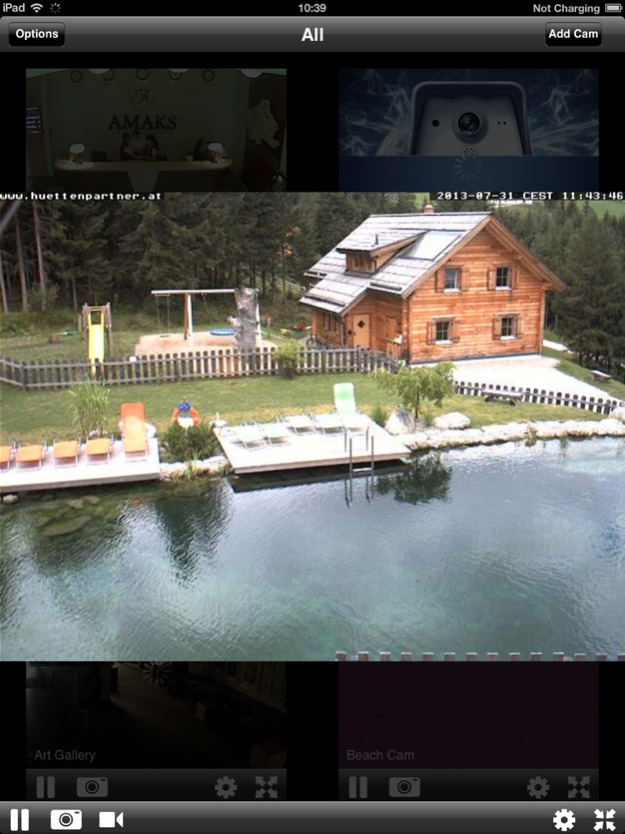
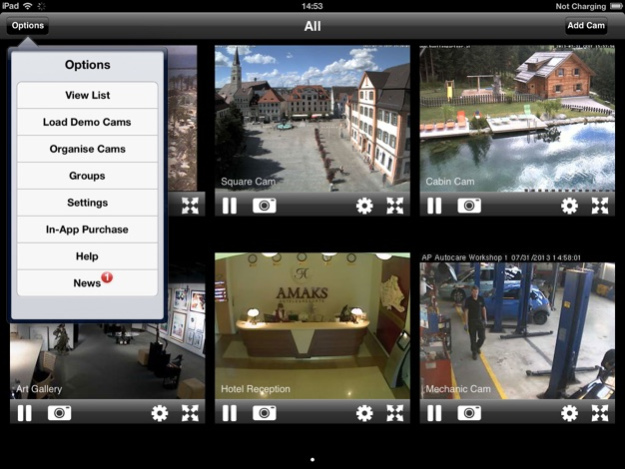

View and control your D-Link Network Camera on your iPhone, iPad & iPod Touch.
Quick & Easy Access to your D-Link IP Cam over both Mobile Phone and WIFI Networks, that is great for those on the go.
Move with a swipe. Zoom with a pinch.
- Pan, Tilt & Zoom control available for supported D-Link PTZ models.
(Please see the supported cams list)
Faster than the internet browser interface.
- Your camera(s) appear straight away in the multicam view once the App loads,
then double tap a camera to view a bigger high speed image.
Save snapshots.
- Snapshot feature allows you to save the camera image to your photos folder for use later.
Record video clips
- Record live video from your camera - Up to 30 seconds for each video.
Demo Cams Included.
- There are a number of D-Link Cameras available on startup to help you get started.
Add unlimited cameras.
- Your password details are saved securely, meaning you only need to enter them once,
and you can add as many D-Link Cams as you want.
Compatibility
- Works with most models of D-link camera. (See the compatibility list below for your camera model)
- Works with Dynamic DNS services.
Support
- We value our customers, so if you have any questions or problems contact us using the support section of our website:-
www.eyespyfx.com/support.php
********************
Supported Cameras
DCS-G900, DCS-900, DCS-900W, DCS-910, DCS-920,
DCS-930, DCS-930L, DCS-932, DCS-932L, DCS-942, DCS-942L
DCS-1000, DCS-1100, DCS-1130,
DCS-2000, DCS-2100, DCS-2100G, DCS-2102, DCS -2103,
DCS-2121, DCS-2130, DCS-2210, DCS-2230
DCS-3110, DCS-3112, DCS-3220, DCS-3220G, DCS-3230,
DCS-3410, DCS-3411, DCS-3420, DCS-3430, DCS-3710, DCS-3710 B1,
DCS-3715, DCS-3716
DCS-5220, DCS-5230, DCS-5230L, DCS-5300, DCS-5300G,
DCS-5605, DCS-5610, DCS-5635
DCS-6110, DCS-6111, DCS-6112, DCS-6113,
DCS-6410, DCS-6510, DCS-6511, DCS-6616, DCS-6620, DCS-6620G,
DCS-6815, DCS-6815 B1, DCS-6817, DCS-6817 B1, DCS-6818, DCS-6818 B1,
DCS-7110, DCS-7410, DCS-7510
---------------------------------------
Not Supported (These cameras will NOT work on the app)
DCS-950, DCS-950G, DCS-1110,
DNS-722-4, DNS-726-4,
DVS-210-1, DVS-310-1, DVS-V310-4
---------------------------------------
Pan/Tilt Support.
DCS-2000, DCS-2100, DCS-2100G, DCS-2120,
DCS-5220, DCS-5300, DCS-5300G,
DCS-6620, DCS-6620G
---------------------------------------
If your cam isn't listed above, you can contact us through our support page to find out if your camera will work.
Sep 25, 2018
Version 3.1.7
Bug fixes
About Viewer for D-Link Cams
The company that develops Viewer for D-Link Cams is EyeSpyFX. The latest version released by its developer is 3.1.7.
To install Viewer for D-Link Cams on your iOS device, just click the green Continue To App button above to start the installation process. The app is listed on our website since 2018-09-25 and was downloaded 0 times. We have already checked if the download link is safe, however for your own protection we recommend that you scan the downloaded app with your antivirus. Your antivirus may detect the Viewer for D-Link Cams as malware if the download link is broken.
How to install Viewer for D-Link Cams on your iOS device:
- Click on the Continue To App button on our website. This will redirect you to the App Store.
- Once the Viewer for D-Link Cams is shown in the iTunes listing of your iOS device, you can start its download and installation. Tap on the GET button to the right of the app to start downloading it.
- If you are not logged-in the iOS appstore app, you'll be prompted for your your Apple ID and/or password.
- After Viewer for D-Link Cams is downloaded, you'll see an INSTALL button to the right. Tap on it to start the actual installation of the iOS app.
- Once installation is finished you can tap on the OPEN button to start it. Its icon will also be added to your device home screen.
Program Details
System requirements
Download information
Pricing
Version History
version 3.1.7
posted on 2018-09-25
Sep 25, 2018
Version 3.1.7
Bug fixes
Disclaimer
Official App Store Link
We do not host Viewer for D-Link Cams on our servers. We did not scan it for viruses, adware, spyware or other type of malware. This app is hosted by Apple and passed their terms and conditions to be listed there. We recommend caution when installing it.
The App Store link for Viewer for D-Link Cams is provided to you by apps112.com without any warranties, representations or guarantees of any kind, so access it at your own risk.
If you have questions regarding this particular app contact the publisher directly. For questions about the functionalities of apps112.com contact us.
